11xplay App
Here is the honest version: the 11xplay app is not a file you download — it is the full 11xplay platform running as a fast web app in any browser. Open it on Android or iPhone, add it to your home screen for a one-tap icon, and play with the same ID, wallet and games as the website.
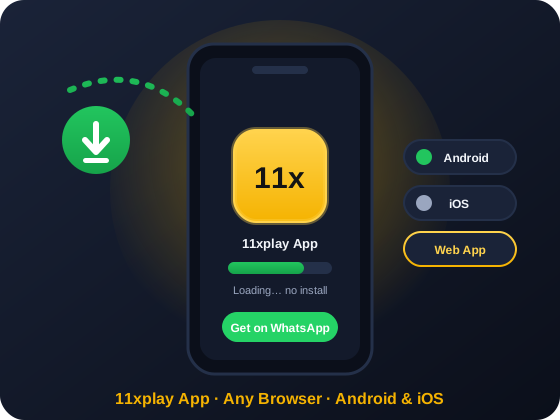
How to Get the 11xplay App on Android: Add to Home Screen
There is no 11xplay file to hunt for and no phone setting to change. 11xplay runs in your browser, and Android's Chrome lets you save it to your home screen so it opens like an app. Here is the whole process.
Open 11xplay in Chrome
On your Android phone, open 11xplayproo.in in Chrome or any browser. The full 11xplay platform loads straight away — there is nothing to install and no file to download.
Open the Browser Menu
Tap the three-dot menu in the top-right corner of Chrome. This is the same menu you already use for bookmarks and settings.
Tap "Add to Home Screen"
Choose "Add to Home screen" (some phones show it as "Install app") and confirm. A 11xplay icon is placed on your home screen so you can reopen it with one tap, just like an app.
Log In and Play
Tap the new 11xplay icon and sign in with your existing 11xplay ID username and password. Your wallet balance, bonuses and bet history are already there — start playing right away.
11xplay on iPhone & iOS
It works exactly the same on iPhone: there is no separate 11xplay app to install, and any App Store listing claiming to be ours is not. iPhone users do not need one — the 11xplay platform is fully optimised for Safari and runs every game, market and payment feature in the browser.
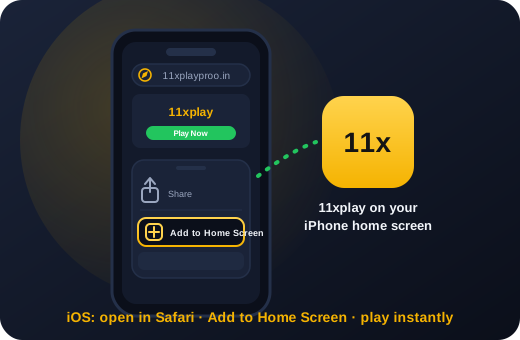
For one-tap access, open the site in Safari, tap the Share icon and choose Add to Home Screen. You get a 11xplay icon on your home screen that opens full-screen like an app, with the same login and wallet as everywhere else.
- Works on any iPhone or iPad with Safari — no install, no storage used
- Home-screen icon opens full-screen, app-style
- Saved-password autofill makes signing in quick
Need a hand setting it up? Ask the WhatsApp team for the iOS guide — they will walk you through it in two minutes.
11xplay App vs Mobile Website
The 11xplay app and the mobile website are the same platform in the same browser — one opens from a home-screen icon, the other from a bookmark. Here is an honest comparison.
| Point | 11xplay App (home screen) | Mobile Website |
|---|---|---|
| Access | Any browser — one tap from your home-screen icon | Any browser — type the URL or use a bookmark |
| Download | Not required — nothing to install | Not required |
| Platforms | Android & iPhone | Android & iPhone |
| Updates | Always current — it is the live site | Always current automatically |
| Storage used | None | None |
| Fake-file risk | None — there is no file to fake | None |
| Your ID & wallet | Identical on both — one balance, one bet history | |
In short, "app" and "website" are two names for the same 11xplay experience. If you are brand new, register your ID first — it takes two minutes and works on either.
Web App, APK File or Play Store: What Actually Exists for 11xplay
Searches for "11xplay app download" bring up three very different things. Only one of them is real. This is how we explain it on WhatsApp every day.
| Question | Web app (home screen) | APK file | Play Store / App Store |
|---|---|---|---|
| Does it exist? | Yes. This is the official way to use 11xplay on a phone. | No official APK has ever been released. | No listing. Store policies do not allow it, and we have never published one. |
| Where it comes from | 11xplayproo.in, opened in Chrome or Safari and added to your home screen. | Telegram channels, "apk mirror" sites, forwarded WhatsApp files. None of them are us. | Any listing using the name is a third-party app with no link to your real ID. |
| Updates | Automatic. You always load the live site. | Whatever the uploader decides. Often months old. | Not applicable, since there is nothing to update. |
| Risk | None beyond normal browsing. No code is installed on the phone. | High. Sideloaded files can read SMS OTPs, overlay fake login screens and drain UPI. | Medium. Lookalike apps collect usernames and passwords. |
| Our recommendation | Use this. It is what our own team uses. | Never install one, even if a "senior agent" sends it. | Ignore it. Report it if you can. |
For a betting account the web app is the safer design, not a compromise. Nothing is sideloaded, so a modified file cannot sit between you and the exchange. Every open loads the current version, so a bug fixed this morning is gone by your next refresh. And the login is the same one you use on desktop, so a lost phone is handled by changing one password. Our safety write-up has the detail.
Data, Battery and Speed: What the 11xplay App Uses
These are rough figures from our own phones on Jio and Airtel 4G during an IPL evening. Your numbers will vary, but the shape is the same.
Match-day data saving
Each open market is its own live stream. Close other browser tabs so the phone is not also refreshing a score site and a video feed. The Pro exchange view shows every runner at once and uses roughly double the data, so keep it for Wi-Fi unless you have a big plan.
Keeping the odds fresh
If a price looks stale, pull down to refresh before you place anything. Android and iOS both suspend background tabs, and one parked for a few hours can show odds from an over that finished long ago. Reopen from the home-screen icon rather than trusting what was on screen.
Older phones
Android 8 or newer and iOS 14 or newer run everything without fuss. On older phones with 2 GB of RAM, stay on the standard view and avoid the Pro view during a run chase. Chrome's lite or data-saver mode is fine to leave on.
What You Get on the 11xplay App
- The complete games library: cricket exchange, live casino, Aviator, Teen Patti
- The same ID and wallet as the website, synced in real time
- UPI deposits and fast withdrawals straight from your phone
- A home-screen icon that opens 11xplay full-screen, app-style
- WhatsApp support reachable from every page
- Always the current version — because it is the live site, never an old build
Everything you can do after 11xplay login on desktop — including the 11xplay Pro exchange view — works the same way in the browser on your phone. "11xplay" and "11xplay Pro" are the same platform and the same ID.
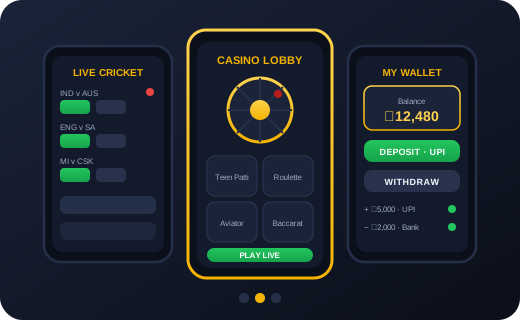
Beware Fake "11xplay APK" Files
Because 11xplay is a web app, any website, Telegram channel or third-party portal offering an "11xplay APK", an "11xplay Pro app" file or a "download 11xplay" link is not official — and those files can be tampered with or carry malware. You never need to download anything to play.
If someone sends you a file claiming to be 11xplay, do not install it. Simply open 11xplayproo.in in your browser, or ask our WhatsApp team to confirm the real link. The 18+ rule applies everywhere on 11xplay, and if playing ever stops feeling fun, our responsible gaming page explains how to set limits or pause your account.
Get Started on WhatsApp
App Troubleshooting: The Five Things That Actually Go Wrong
Almost every "the app is broken" message we receive is one of these five. Try the fix first, then message us if it still misbehaves.
| Symptom | Usual cause | Fix |
|---|---|---|
| Blank or white screen after an update | The phone is loading a cached old version of a page that has changed. | In your browser settings, clear site data for 11xplayproo.in, then reopen from the icon. Your balance and bets are on the server, so nothing is lost. |
| Odds frozen, bets not placing | The phone suspended the tab to save battery, so the live connection dropped. | Pull down to refresh. If the clock in the match header is still behind, close the tab fully and reopen. |
| "Add to home screen" is missing from the menu | The link was opened inside WhatsApp, Instagram or Telegram's built-in browser, which hides that option. | Tap the three dots and choose "Open in Chrome" (or "Open in Safari" on iPhone), then add it from there. |
| Notifications not arriving | Notification permission for the site was denied or never asked. | Browser settings, Site settings, Notifications, set 11xplayproo.in to Allow. On iPhone this only works from the home-screen icon, not a normal Safari tab. |
| Logged out every time you open it | Private or incognito browsing, or cookies blocked for the site. | Use a normal window and allow cookies for the site. If you share the phone, log out manually instead of relying on incognito. Our login guide covers saved-password setup too. |
App Notes
Short updates from the support desk about the phone experience. Newest first.
Fake APKs now carry a banking trojan
Players sent us files this week from Telegram groups titled "11xplay app download". Each asks for SMS and accessibility permissions on install, the pattern used by banking trojans that read OTPs. Never install an APK with our name on it. If you already did, uninstall it, change your password from another device and tell your bank.
Live match screen stays awake
The web app now keeps the screen on while a session or fancy market is open, so the phone no longer locks mid-over. It releases the lock when you leave the match page, so battery impact is small. Works on Android Chrome and on iPhone from the home-screen icon.
iOS 26: re-add the icon after updating
Some iPhone users on iOS 26 found the old home-screen icon opening a blank page after the OS update. Delete the icon, open the site in Safari, and add it again. Your login is unaffected; the icon just needs to be recreated once.
Frequently Asked Questions
Is there an 11xplay app on the Google Play Store?
No. There is no 11xplay listing on the Google Play Store or the Apple App Store, and there never has been. Any app using the name in a store is from a third party and is not connected to your ID. Open the site in your browser and add it to your home screen instead.
Will the 11xplay web app work on Jio Phone or KaiOS?
Only in a limited way. KaiOS cannot add sites to the home screen, and the live odds screen is heavy for the phone's memory. Use the mobile website in the built-in browser for checking your balance or placing a simple bet, and switch to an Android or iPhone for live markets.
How do I update the 11xplay app?
You do not need to. Because the app is the live website, every time you open it you get the current version. If a screen looks old or a new feature is missing, pull down to refresh, or hard-refresh by clearing site data for 11xplayproo.in in your browser settings and opening it again.
How do I get the 11xplay app?
There is no separate app to download. Open 11xplayproo.in in any browser on your phone, then use your browser menu to Add to Home Screen — you get a 11xplay icon that opens the platform full-screen, just like an app. Sign in with your 11xplay ID and play.
Is there an 11xplay APK to download?
No. 11xplay runs as a web app in your browser, so there is no official file to install. Any site or message offering an "11xplay APK" is not from us and may be unsafe — you never need to download anything to play. Just open the site in your browser.
Is the 11xplay app free?
Yes, completely. There is nothing to buy, no subscription and no usage fee. You only ever spend what you choose to deposit into your own wallet for playing.
Is there an 11xplay app for iPhone or iOS?
Yes, the same way as Android: open the site in Safari, tap Share, and choose Add to Home Screen. You get a full-screen, app-like 11xplay icon with the same login and wallet — no App Store download required.
Are 11xplay and 11xplay Pro the same app?
Yes. "11xplay" and "11xplay Pro" are the same platform and the same ID — Pro simply refers to the advanced exchange view. Both open in your browser with the same username and password.
Can I use the same ID on the app and the website?
Yes — one 11xplay ID works everywhere. Because the app and the website are the same platform in the browser, your balance, bonuses and bet history stay in sync across your phone and the desktop 11xplay login.
The 11xplay app is not opening. What should I do?
Since it runs in your browser, refresh the page or try a different browser, and check your internet connection. Clearing your browser cache usually fixes a stuck screen. If it still will not load, message our WhatsApp team and a real person will help you live.
Play 11xplay on Your Phone — No Download Needed
Open 11xplayproo.in in any browser, add it to your home screen, and play with your same 11xplay ID. Message us on WhatsApp for help or a new ID.
Get Your 11xplay ID on WhatsApp